Soft and Hard Links in Linux
Links in Linux Filesystem
- A link is a mechanism that allows multiple references (names or path) to point at single file or directory within the filesystem.
- It is essentially a way to create alternate access points to data that already exists in the disk, either by referencing the actual data or by referencing the file's path.
So in short:
In the Linux filesystem, links are references to files or directories.
Inode(Index-node)
Before understanding more about links first we need to understand about inode.
- Inode is a data structure.
- It is used to store metadata about the files and directories.
- An inode is a unique identifier for a file within a specific filesystem.
- Each file and directory has it's own unique inode number.(except hard links)
- It can be accessed by using
-iflag inlscommand.
Here you can see the inode numbers of directories in my home directory.
Types of Links
There are two types of links:
- Hard Link
- Soft Link(Symbolic Link)
Hard Link
- Let's say I have a file named
file1.txtand I created a hard link offile1.txtasfile2.txtwhich is essentially a reference to thefile1.txt.
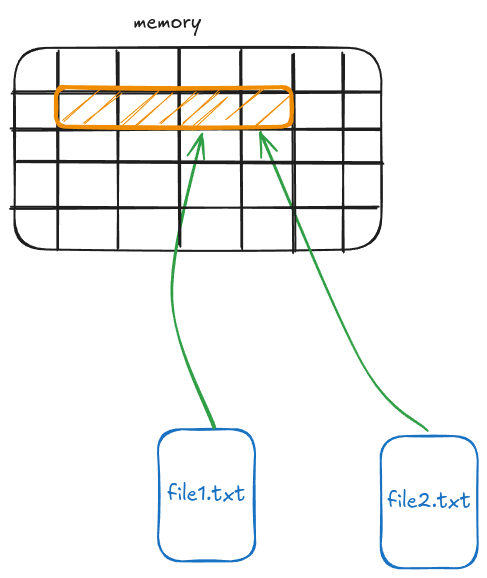
- As it appears to be that there are two files here but actually in disk the content of the file is stored only once and both files points to that memory location
- So now when I try to access any of two files the filesystem point to the highlighted disk space.
- Both files will have same inode numbers because inode numbers are allotted according to disk space, as both files points to the same disk address they will have the same inode number.
- When you delete any one of the file the other one will be unaffected, but when you make changes in one file, it will reflect in the other file, because at the low level you are manipulating the bits stored in the disk address which is linked to both files.
Creating Hard Link
Let's create a file and populate it with some text.
Now let's create a hard link of hello.txt to hello2.txt
Now check the contents of the hello2.txt
It is same as of hello.txt.
Now let's see the inodes of these files, they are same it means both files points to the same location in the disk.
Try to make changes in one file and then see if the changes reflect in other file. Delete one file and see if it affects the other file. The advantage of hard link is it provides file redundancy without data duplication.
Soft Link(Symbolic Link)
- In soft link the linked file points to the file not the disk location.
- The
file2.txtcontains the pathname offile1.txt. - Unlike hard links, a symlink doesn't point directory to the files's inode.
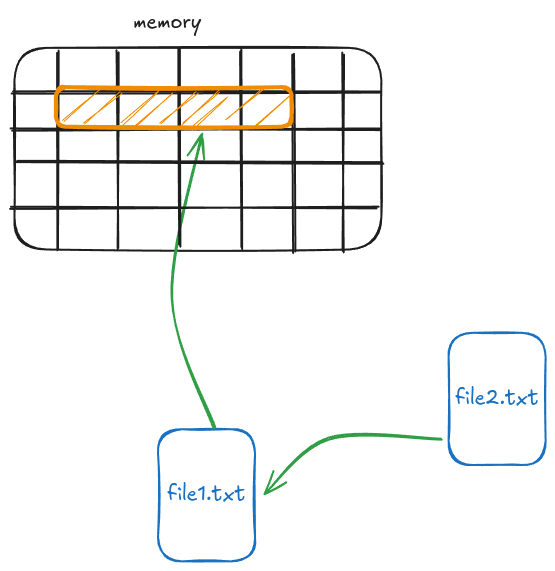
- Let's create a file and populate it
- Now create a symbolic link
- Let's see the inode of these files. They are different because they are not pointing to the same disk address. The file
test2.txtactually contains a string that holds the path of thetest1.txtnot the contents of the target file.
- in this case also the changes of one file will reflect on other file also.
- If you delete the
test1.txtthentest2.txtwill be useless. But vice-versa will not be true.
Advantage of Symbolic Link over Hard Link
- Can link to directories.
- A soft link can point to a file or directory on a different mounted filesystem, partition, or device. Hard link can't link files between different devices or filesystem because hard links point directly to inodes, and inodes are only meaningful within the filesystem where they were created.
- Can link to non-existent targets. Useful in scripting, where the target might appear later.
- Dynamic path resolution. Symbolic links resolve to the current location of the target path. If the symlink is updated (e.g., re-pointed to a different version of a file), it reflects the change immediately. Useful for switching between different versions of software.